

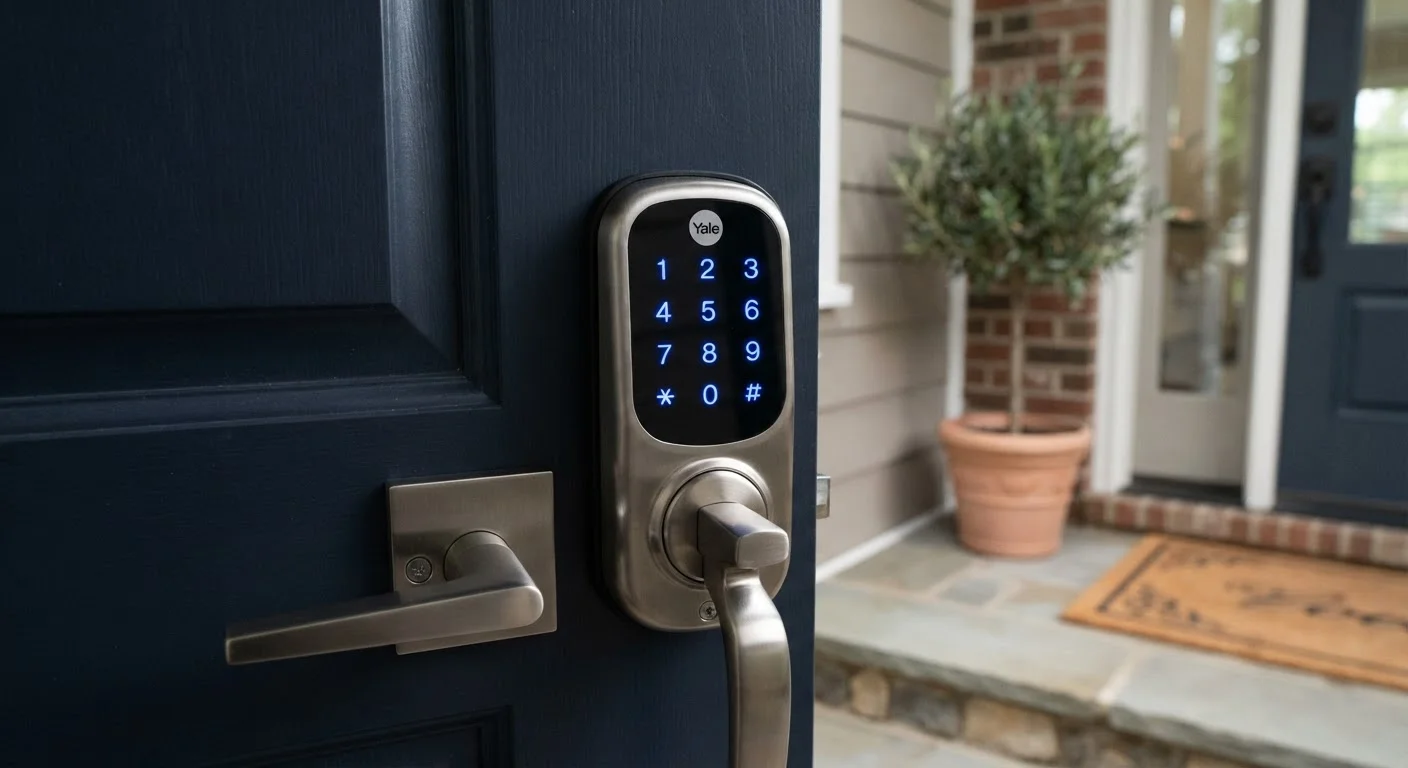
How Smart Locks Authenticate Users
Traditional locks use a single credential - a cut metal key - to verify that someone is authorized to enter. Smart locks expand that credential set significantly. The most common authentication methods include:
- PIN codes: A numeric sequence entered on a physical keypad. Users can have individual PINs, making it easy to revoke access for a specific person without changing the lock.
- Smartphone app: The lock communicates with your phone over Bluetooth or Wi-Fi. Some models require your phone to be nearby (proximity unlock); others allow remote access from anywhere.
- Key fobs or cards: Small RFID-enabled devices that communicate wirelessly with the lock when held close to a reader.
- Biometrics: Fingerprint scanners built into higher-end models read your fingerprint and compare it to stored templates on the lock itself.
Many smart locks support multiple methods simultaneously, so a family can use a combination of app, PIN, and physical key depending on the situation. Understanding which credentials a lock supports - and which ones matter for your household - is one of the first practical questions to ask.
Start With Your Most-Used Credential
Before evaluating any smart lock, decide which authentication method your household will use most - PIN, app, or key fob. A lock with a feature-rich app is of limited value if family members don't consistently carry their smartphones. Choose based on your actual daily habits, not the most impressive spec sheet.
Access Logs and Remote Management
One of the clearest functional differences between a smart lock and a traditional deadbolt is the access log. Every time the lock is used - whether by a PIN, an app, or a key fob - the event is timestamped and recorded. This gives homeowners a clear picture of who entered and when, without relying on memory or cameras.
Remote management extends that control further. Through an associated app, you can:
- Lock or unlock the door from anywhere with an internet connection
- Create, share, or revoke access credentials without being home
- Set schedules (e.g., a dog walker's PIN only works between 11 a.m. and 1 p.m. on weekdays)
- Receive push notifications whenever the door is locked or unlocked
Whether access logs are stored locally on the lock or on remote servers has meaningful implications for both privacy and reliability. Our article on local vs. cloud processing in smart home devices explains why that distinction matters for any connected device in your home.
~6-12 mo
Typical smart lock battery life
Most manufacturers rate their locks at six to twelve months on standard AA batteries under average residential use.
AES-128
Common encryption standard used
AES-128 (Advanced Encryption Standard with 128-bit key length) is a widely referenced benchmark for smart lock communication encryption.
Grade 1
Highest ANSI residential lock rating
ANSI/BHMA Grade 1 is the strongest classification for residential deadbolts, covering physical resistance to forced entry independently of smart features.
Security Considerations and Power Loss
Smart locks introduce categories of risk that traditional deadbolts do not share. The most important factors to evaluate include:
Encryption and Communication Protocol
A lock that transmits data without encryption is potentially vulnerable to signal interception. Look for locks that explicitly document their encryption standard (AES-128 is a common benchmark). The communication protocol also matters - Bluetooth-only locks have a limited attack surface compared to Wi-Fi-connected ones, but lose remote access capability in exchange. For a broader look at how these protocols fit into a connected home, see how smart home devices communicate.
Power Loss
Smart locks run on batteries - typically four to eight AA batteries - with most manufacturers estimating six to twelve months of life under normal use. When batteries run low, the lock should alert you through the app or an indicator light before failing entirely. Critically, nearly all consumer smart locks include a physical key cylinder for exactly this scenario. Some models add an external 9-volt battery terminal on the keypad that provides enough emergency power to operate the motor once.
Physical Security Rating
A smart lock's electronics don't replace the need for solid physical construction. ANSI/BHMA grading (Grade 1 being the strongest for residential use) applies to the lock's mechanical resistance to forced entry, separate from its digital features. Both dimensions of security deserve attention.
Smart Locks Within a Broader Smart Home
A smart lock rarely operates in isolation. Many homeowners integrate them with video doorbells, smart lighting, or voice assistants so that unlocking the door can trigger a sequence of actions - turning on entryway lights, disarming a security system, or announcing an arrival through a speaker. That integration depends on your lock supporting compatible protocols or platforms.
Unlike simpler connected devices - such as the ones covered in our overview of smart plugs as an entry point into connected homes - smart locks involve a higher-stakes decision because they directly control physical access to your home. That raises the importance of understanding the full security picture, including how your smartphone's own security settings interact with lock apps. Our look at mobile security settings most people leave switched off is a useful companion read.
Before committing to a specific smart lock, confirm which smart home platforms it supports natively, whether it requires a separate hub or bridge, and how it behaves if that hub loses power or internet connectivity. Answering those questions upfront leads to a far more reliable experience day to day.
A homeowner hires a contractor to renovate their kitchen while they're at work. Instead of leaving a key under the mat, they create a temporary PIN in their lock's app that expires at 5 p.m. that day.
A family returns from vacation to find their front door was unlocked - the lock's app shows the door was left open by a teenager at 3:47 p.m. two days ago.
During a power outage, a homeowner's smart lock stops responding to the app, but she uses the included physical key to enter normally.
A renter sets up a smart lock that works over Bluetooth alone, with no cloud account required, so all access data stays on the device itself.
Frequently Asked Questions
Most smart locks retain their locked or unlocked state when power is lost and include a physical key cylinder as a backup. Some models also support emergency power via an external 9-volt battery terminal on the exterior of the lock. Always check whether your specific model has a mechanical key override before relying on it.
Smart locks using encrypted communication protocols (such as AES-128 or higher) are significantly harder to compromise than older or cheaper models. However, no connected device is entirely immune to vulnerability. Keeping firmware updated and using strong, unique PINs reduces risk considerably.
Many smart locks operate locally via Bluetooth, meaning basic locking and unlocking still work without internet. Remote access - such as unlocking from a different location - typically requires a Wi-Fi bridge or an active internet connection. Some models store access credentials locally so they function even when your router is offline.
Smart locks are generally designed to fit standard US deadbolt cutouts (ANSI Grade 2 or Grade 1), but door thickness, backset distance, and existing hardware can vary. Measuring your door and checking manufacturer specifications before buying is essential to ensure a proper fit.
Yes - one of the most practical features of smart locks is the ability to create time-limited access codes. You can set a PIN that expires after a specific date or window of hours, then automatically revoke it, all from an app without needing to be home.
It depends on the model. Some smart locks replace only the interior deadbolt thumb turn and motor, keeping the existing exterior hardware in place. Others replace the entire deadbolt assembly. Retrofit models tend to be easier to install without modifying the door itself.
The content on this site is provided for informational purposes only and should not be considered a substitute for professional advice. While we strive to provide accurate and up-to-date information, we make no guarantees regarding its completeness or accuracy. Always consult a qualified professional for advice specific to your circumstances before making any decisions.