

Our Verdict
Neither system is universally superior - the right fit depends on your home's physical footprint and how you use Wi-Fi daily. A traditional router handles most apartments and smaller homes without issue, while a mesh system is a genuine problem-solver for larger, multi-level, or architecturally complex spaces. Spending more doesn't automatically mean better performance for your specific situation.
| Best for | Recommended |
|---|---|
| Apartments, condos, or smaller single-storey homes | Traditional Router |
| Large multi-storey homes or properties with thick walls and dead zones | Mesh Wi-Fi System |
| Those wanting simplicity, lower cost, and easy management | Traditional Router |
| Households with many simultaneous users and devices spread across rooms | Mesh Wi-Fi System |
How Each System Actually Works
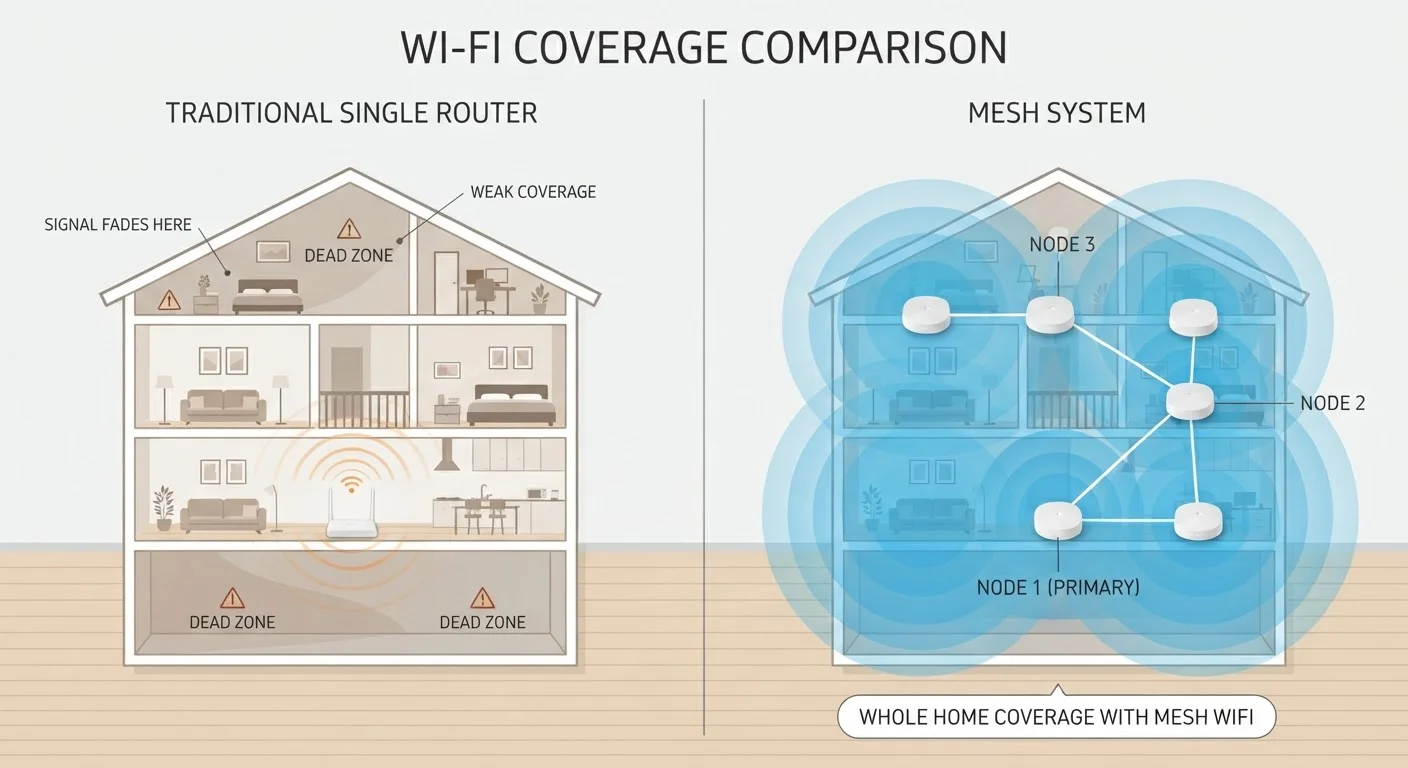
A traditional router connects to your modem and broadcasts a wireless signal from a single fixed point. Every device in your home communicates back to that one hub. Performance holds up well when devices are close by, but signal strength typically degrades with distance and obstacles - walls, floors, and appliances all absorb and scatter radio waves.
A mesh system, by contrast, uses multiple nodes placed around the home. One node connects to the modem; the others communicate with each other to extend coverage seamlessly. Devices moving through the home hand off between nodes automatically, usually without dropping a connection. For a plain-language breakdown of networking terminology like SSID and bandwidth, see our Home Network Glossary.
| Traditional Router | Mesh Wi-Fi System | |
|---|---|---|
| Coverage area | Typically up to ~1,500-2,000 sq ft | Scales to 3,000-6,000+ sq ft with added nodes |
| Typical upfront cost | Lower; one device to purchase | Higher; multiple nodes required |
| Setup complexity | Straightforward, single device | Simple app-guided setup for most systems |
| Dead zone handling | Limited; signal drops with distance | Strong; nodes fill gaps throughout the home |
| Device handoff while roaming | Manual or abrupt switching | Seamless automatic handoff between nodes |
| Advanced user control | More granular manual settings | App-focused; less manual configuration |
| Ongoing costs | Rarely any subscription needed | Some platforms charge for premium features |
When a Traditional Router Is Enough
If your living space is under roughly 1,500 square feet and relatively open in layout, a quality single router placed centrally will almost certainly serve you well. Apartments, studios, and smaller single-storey homes rarely develop the dead zones that justify a mesh upgrade.
Router hardware has improved considerably. Modern single-unit routers support the latest Wi-Fi standards - our Wi-Fi 6 vs Wi-Fi 5 comparison explains what those standards actually change for everyday households - and can handle dozens of simultaneous connections without strain. If your current pain point is slow internet speeds rather than spotty coverage, your router may not be the problem at all; your internet service plan or modem may be the limiting factor.
Test Before You Upgrade
Before investing in a mesh system, try repositioning your existing router to a more central location - ideally elevated and away from walls and appliances. Many coverage complaints are solved by placement alone. Running a free speed test app in each room can help you identify whether you have a true dead zone or simply a slower-than-expected signal that's still functional.
When Mesh Makes a Real Difference
Mesh systems earn their keep in specific circumstances. Multi-storey homes, older construction with dense plaster walls, or sprawling open-plan homes exceeding 2,500 square feet are all scenarios where a single router's signal reliably struggles. If you find yourself moving your laptop to a specific room to get a usable connection, or if video calls drop when you walk to another part of the house, those are genuine coverage problems a mesh system is designed to fix.
Homes loaded with smart devices also benefit. When dozens of IoT sensors, cameras, and voice assistants compete for airtime, distributing the load across multiple nodes reduces congestion. If you run security cameras, our guide to wired vs wireless cameras explains how network reliability affects footage quality and storage. Mesh also simplifies network management for less technical users - the experience of one unified network name throughout the home is genuinely more convenient than manually switching between router and extender SSIDs.
The Middle Ground: Routers With Access Points
There's a practical option between a single router and a full mesh system: a router paired with one or more wired access points. If you can run an Ethernet cable to a secondary unit in a problem area, this setup delivers consistent, high-quality coverage without the premium price of a mesh kit. It requires more setup effort and some comfort with basic networking, but the performance trade-off is often favorable.
Powerline adapters - which carry network signals through your home's electrical wiring - offer a cabling-free alternative, though speeds and reliability vary depending on the age and wiring quality of the building. This hybrid approach suits technically comfortable users willing to invest setup time rather than money. For those managing a broader smart home setup, network security practices become important regardless of which hardware you choose, particularly around guest networks and firmware updates.
Cost, Complexity, and Long-Term Considerations
Mesh systems typically cost two to four times more than a comparable quality router, and that gap widens if you need three or more nodes for larger spaces. Some mesh platforms also require subscription fees to unlock advanced features like parental controls or detailed usage analytics - a factor worth checking before purchase.
On the management side, mesh systems are generally easier for non-technical users day to day: apps are polished, and the networks are largely self-managing. However, troubleshooting when something goes wrong can be harder because the system is more complex. Traditional routers offer more manual control, which experienced users may prefer. Consider also that mesh hardware becomes a long-term ecosystem commitment - nodes from one manufacturer often don't interoperate with those from another.
The upgrade from a traditional router to a mesh system makes the most sense when you've confirmed that coverage - not speed, not your ISP plan, not device settings - is the actual bottleneck. Diagnosing that correctly before spending saves both money and frustration.
The content on this site is provided for informational purposes only and should not be considered a substitute for professional advice. While we strive to provide accurate and up-to-date information, we make no guarantees regarding its completeness or accuracy. Always consult a qualified professional for advice specific to your circumstances before making any decisions.